Find ghost accounts in Microsoft Entra ID
Ghostbuster for Entra ID is a free script that finds accounts nobody uses, people who left but can still sign in, admins without MFA, and paid licenses sitting on ghost accounts. It runs on your own computer and changes nothing.
Version 0.1.0 · Python 3.8+ · Windows, macOS and Linux · MIT license
What it checks
Ghostbuster reads your tenant through Microsoft Graph with read-only permissions.
Accounts nobody uses
Members who haven’t signed in for 90 days or never did. Add a list from HR and it also finds people who left but can still sign in.
Guests
Guests who never accepted their invitation or haven’t signed in for months, and guests with admin roles.
Admin roles
Everyone with an admin role, including roles held through groups and PIM. Too many Global Administrators, inactive admins and admin accounts synced from Active Directory.
Sign-in security
Whether MFA is enforced through security defaults or Conditional Access, and which accounts haven’t registered MFA.
Licenses
Paid licenses on inactive and disabled accounts, and licenses you pay for but haven’t assigned. Add your prices to see the cost per year.
Apps and secrets
Apps that can read every mailbox or change the directory, and app secrets that have expired or are about to.
What you get
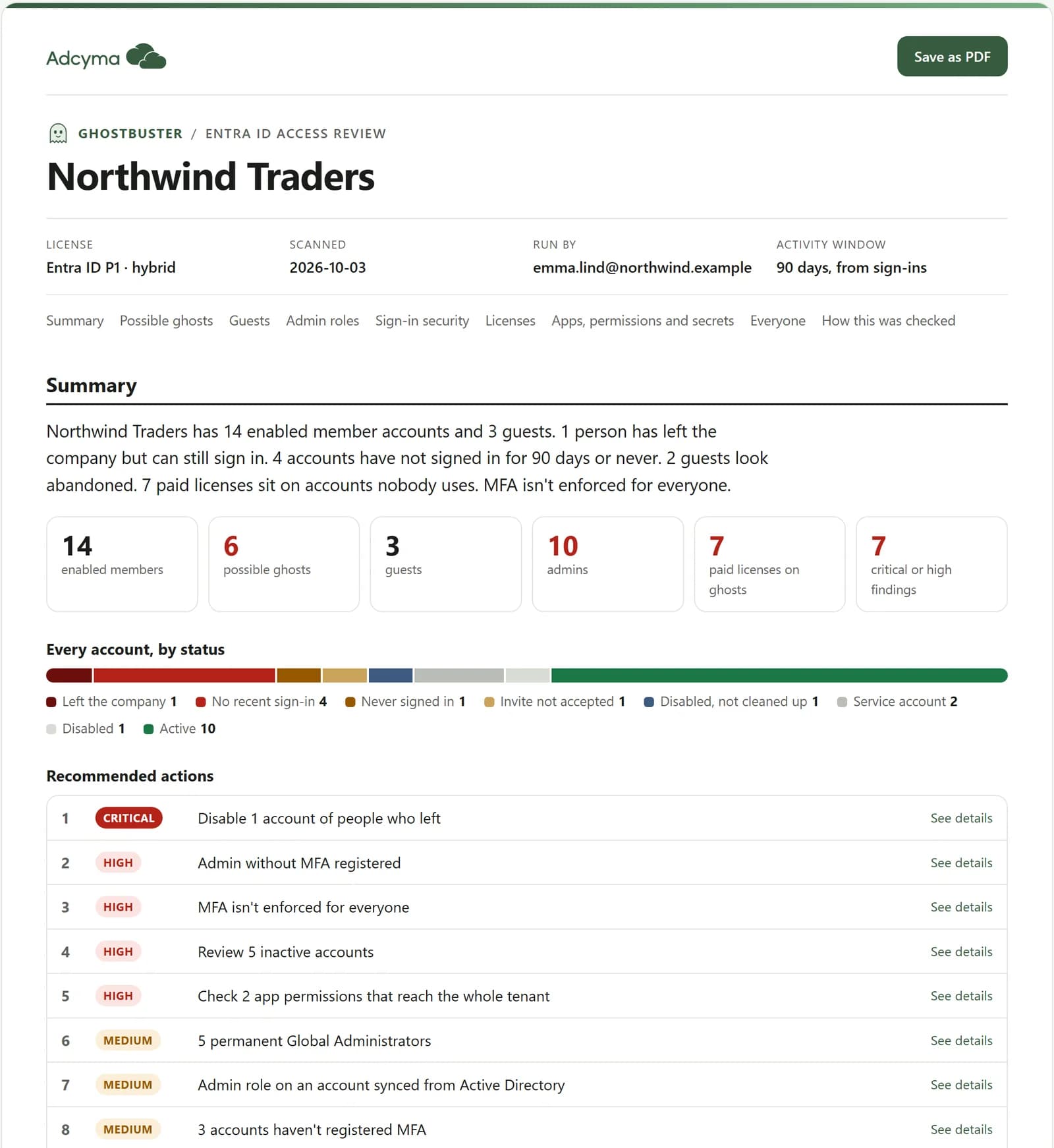
When the scan finishes, the report opens in your browser.
- A summary with recommended actions, most urgent first
- Possible ghosts, guests, admin roles, MFA, licenses and apps, account by account
- Save as PDF to share it with your team or management
- Spreadsheets, plus ready-made PowerShell commands to fix each finding. They are all commented out until you have reviewed them
What you need
Most IT admins already have everything. The only extra step is a one-time approval from an administrator.
A computer with Python 3.8 or newer
Windows, macOS or Linux. Macs and most Linux machines already have Python. On Windows, run winget install Python.Python.3.12 or get it from python.org. Nothing else needs installing.
An account that can read the directory
Global Reader is enough, and it can’t change anything. If your tenant doesn’t have Entra ID P1, also give the account the Reports Reader role so Ghostbuster can read Microsoft 365 usage per person.
A one-time approval by an administrator
The first time, a Global Administrator, Privileged Role Administrator or Cloud Application Administrator approves the read-only permissions below for your organization. After that, anyone with Global Reader can run it.
Entra ID P1 or P2 for the full picture
Sign-in activity and MFA registration need Entra ID P1 or P2, which come with Microsoft 365 Business Premium, E3 and E5. Without them, Ghostbuster uses Microsoft 365 usage instead and skips the MFA check.
The read-only permissions it asks for
| Directory.Read.All | Users, guests, groups, admin roles, apps and licenses |
| AuditLog.Read.All | Last sign-in and MFA registration |
| Reports.Read.All | Microsoft 365 usage, used when sign-in activity isn’t available |
| Policy.Read.All | Security defaults and Conditional Access policies |
| RoleManagement.Read.Directory | Admin role assignments, including PIM eligibility |
All of them are read-only. None of them let Ghostbuster change anything.
How to run it
- 1
Download and run the script
Open a terminal (PowerShell on Windows, Terminal on Mac) and run:
irm https://adcyma.com/tools/ghostbuster-entra.py -OutFile ghostbuster-entra.py python ghostbuster-entra.py - 2
Sign in with Microsoft
A browser window opens with the normal Microsoft sign-in. The app asking for access is called Microsoft Graph Command Line Tools; it’s the app Microsoft’s own Graph PowerShell uses. The first time, an administrator sees the list of read-only permissions: tick Consent on behalf of your organization and accept.
- 3
Wait for the scan
It reads users, roles, licenses, policies and apps. Most tenants take under a minute. Tenants with tens of thousands of users take a few minutes, because Microsoft limits how fast sign-in data can be read.
- 4
Read the report
The report opens in your browser. Use Save as PDF to keep a copy or share it with your manager. Next to it are spreadsheets and a file of suggested fixes, all commented out until you have reviewed them.
- 5
Optional: check against HR and put a price on licenses
Fill in employment_status (active, left or service) in people.csv and run again with --mapping people.csv to find people who left but can still sign in. Add --prices prices.csv with your license prices to see what unused licenses cost per year.
Useful options
| --tenant contoso.com | Scan a specific tenant, for example if you manage several. |
| --days 180 | Change the activity window. The default is 90 days. |
| --mapping people.csv | Check accounts against a list from HR: columns user_principal_name and employment_status. |
| --prices prices.csv | Put a price on unused licenses: columns sku, monthly_price and currency. |
| --device-code | Sign in with a code from another device, for servers without a browser. Security defaults and many Conditional Access setups block this, so use the browser if you can. |
| --client-id <app id> | Sign in with your own app registration instead of Microsoft’s. It needs the redirect URI http://localhost. |
Check the download
SHA-256 checksum of the current version:
26489102fbc55282daec1878a7d1d9e9e0d5a5e03522dc2819b6fda589b63711Compare it with shasum -a 256 ghostbuster-entra.py on macOS and Linux, or Get-FileHash ghostbuster-entra.py on Windows.
Private by design
Read-only
It only asks for read permissions and never changes anything in Entra ID. Fixes are written as commands for you to review and run yourself.
Only talks to Microsoft
It signs in to Microsoft and reads through Microsoft Graph. The results are saved in a folder on your computer. Nothing is sent to Adcyma.
Source you can read
One Python file with no extra packages. Open it in any editor and read what it does before you run it.
View the sourceFree to use and change
Ghostbuster for Entra ID was created by Jens Naterman at Adcyma and is shared under the MIT license. Use it, copy it, change it and share it, also inside your company or in commercial work. The one condition: keep the copyright notice that credits the original author. The full license is at the top of the script.
Read the MIT licenseAlso scanning GitHub? Ghostbuster for GitHub does the same for your repositories.
Common questions
No. It only asks for read permissions. Suggested fixes are written to a file as commented-out PowerShell commands, so nothing changes until you have reviewed them and run them yourself.
Reading the whole directory, sign-in activity and policies needs permissions that Microsoft only lets an administrator approve for the organization. The approval covers read-only permissions and only has to happen once.
No, but you get more with it. P1 or P2, included in Microsoft 365 Business Premium, E3 and E5, gives the last sign-in and MFA registration for every account. Without it, Ghostbuster falls back to Microsoft 365 usage, which only covers licensed users.
No. The script only talks to Microsoft’s sign-in service and Microsoft Graph, and saves the results on your computer. Adcyma never sees them.
That is the app Microsoft’s own Graph PowerShell uses. Ghostbuster signs in through it so you don’t have to register anything. If you would rather use your own app registration, pass its ID with --client-id.
Yes. It is MIT licensed, so you can change it, run it in your company or build on it. Keep the copyright notice that credits Jens Naterman at Adcyma.
Want to automate this, and more?
Ghostbuster is a one-off check. Adcyma runs these checks every day for Entra ID and Active Directory, and takes care of onboarding, offboarding and access reviews, so ghost accounts don’t pile up in the first place.