Find ghost accounts in your GitHub organization
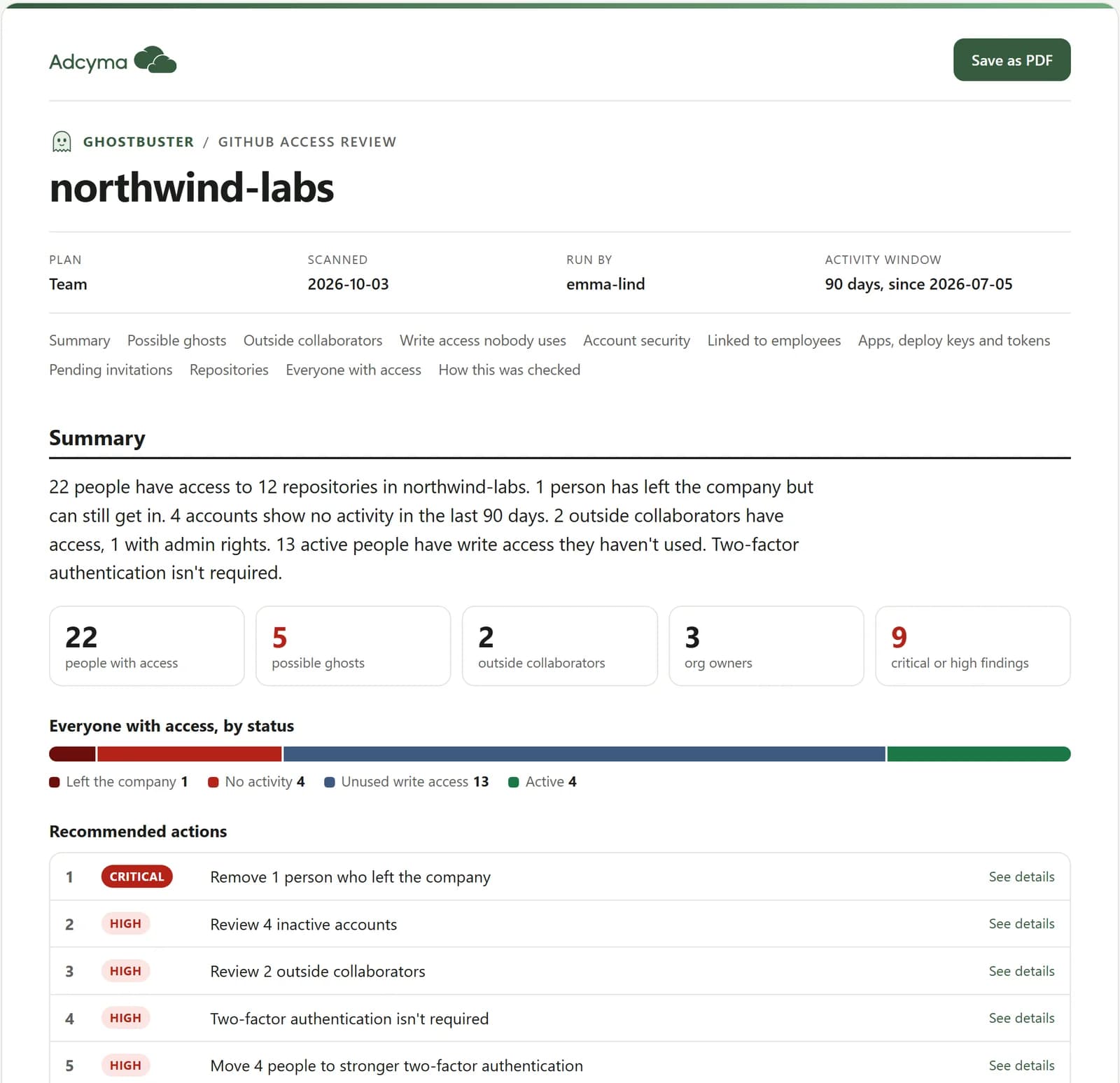
Ghostbuster is a free script that shows who can reach your code, who hasn't used their access in months, and who left the company but never left GitHub. It runs on your own computer and changes nothing.
Version 0.1.0 · Python 3.8+ · Windows, macOS and Linux · MIT license
What it checks
Ghostbuster reads your organization through GitHub’s API and answers four questions.
Who has access to what
Members, owners, outside collaborators, teams, and the permission each person has on each repository, including where that access comes from.
Who is actually active
Pushes, merges, pull requests, reviews and comments over the last 90 days. Anyone with no activity is double-checked with GitHub search before they are flagged.
Who has left the company
Link GitHub accounts to your employees with a simple CSV file, or automatically through SAML single sign-on, and see who kept their access after they left.
Access nobody uses
Write and admin rights people don’t use, outside collaborators, missing two-factor authentication, old deploy keys and apps that can change every repository.
What you get
When the scan finishes, the report opens in your browser.
- A summary with recommended actions, most urgent first
- Possible ghosts, outside collaborators and unused write access, person by person
- Save as PDF to share it with your team or management
- Spreadsheets, plus ready-made commands to fix each finding. They are all commented out until you have reviewed them
How to run it
- 1
Install Python
Python 3.8 or newer. Macs and most Linux machines already have it. On Windows, run winget install Python.Python.3.12 or get it from python.org.
- 2
Download and run the script
Open a terminal and run:
curl -fsSLO https://adcyma.com/tools/ghostbuster.py
python3 ghostbuster.py
Download the file and run it, rather than piping it straight into Python. The script asks a few questions along the way, and a pipe can’t answer them.
- 3
Sign in to GitHub
Ghostbuster signs you in through the GitHub CLI (gh). If it isn’t installed, the script offers to install it and walks you through the sign-in. Run it as an owner of the organization to get the full picture.
- 4
Read the report
The report opens in your browser when the scan is done. Use Save as PDF to keep a copy.
Check the download
SHA-256 checksum of the current version:
3fffc2072c504a8b97a76cef6ee673654b06c0dbe1f92de86f19961a2cf221aeCompare it with shasum -a 256 ghostbuster.py on macOS and Linux, or Get-FileHash ghostbuster.py on Windows.
Private by design
Read-only
It never changes anything in GitHub. Fixes are written as commands for you to review and run yourself.
Nothing leaves your computer
It talks to GitHub’s API and saves the report in a folder on your machine. Nothing is sent to Adcyma.
Source you can read
One Python file with no extra packages. Open it in any editor and read what it does before you run it.
View the sourceFree to use and change
Ghostbuster was created by Jens Naterman at Adcyma and is shared under the MIT license. Use it, copy it, change it and share it, also inside your company or in commercial work. The one condition: keep the copyright notice that credits the original author. The full license is at the top of the script.
Read the MIT licenseCommon questions
No. It only reads. Suggested fixes are written to a file as commented-out commands, so nothing happens until you have reviewed them and run them yourself.
No. The script talks to GitHub’s API with your own GitHub CLI login and saves the results on your computer. Adcyma never sees them.
All of them: Free, Team and Enterprise Cloud. Enterprise Cloud gives the most detail, such as linked single sign-on identities and, with the --audit-log option, events for when someone clones or fetches code.
Yes. On the Free and Team plans GitHub doesn’t show when someone clones or browses code, so the report lists these people as possible ghosts, not confirmed ones. Check with them or their manager before you remove access.
GitHub doesn’t know who your employees are. Fill in the work email and status for each person in people.csv, then run Ghostbuster again with --mapping people.csv. On Enterprise Cloud with SAML single sign-on, accounts are linked automatically.
Yes. It is MIT licensed, so you can change it, run it in your company or build on it. Keep the copyright notice that credits Jens Naterman at Adcyma.
Want to automate this, and more?
Ghostbuster is a one-off check. Adcyma handles onboarding, offboarding and access reviews for Microsoft Entra ID and Active Directory every day, and we are bringing GitHub into it.